This site documents the ObservePoint API.
All ObservePoint functionality and data is available through the API. This allows developers to create custom functionality using ObservePoint.
Examples of what you can build:
- Bulk create audits to visit many websites, and keep all the audit configurations in sync
- Load results from ObservePoint into an internal business intelligence tool like PowerBI, Tableau, Domo, or Looker Studio
- Report issues found by ObservePoint to a ticketing system and run audits to verify remediation
- Execute ObservePoint audits or journeys from your CI/CD pipeline
Become familiar with the following concepts to use the ObservePoint API.
The ObservePoint API is hosted at https://api.observepoint.com. All API requests should be made to this base URL.
Every API request must be authenticated with your API key. API keys exist at the user level.
Get your API key from your API Keys page:
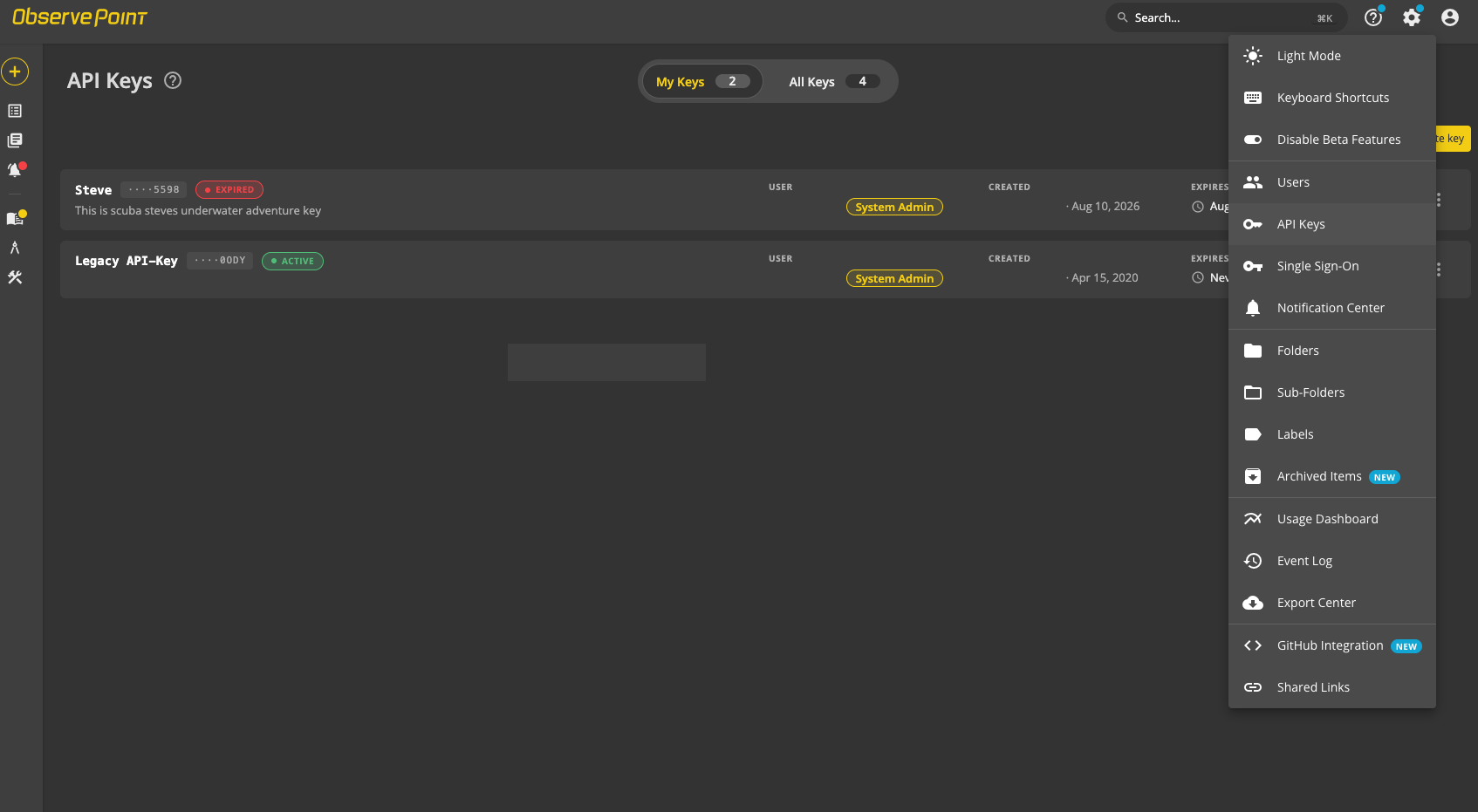
Pass your API key via the Authorization header with the api_key prefix, as follows:
Authorization: api_key YOUR_API_KEY_HEREThe terminal example below shows how to authenticate using the curl command:
curl -X GET \
  -H 'Authorization: api_key PASTE_YOUR_API_KEY_HERE' \
  https://api.observepoint.com/v2/web-audits
Python example of passing your API key:
import requests

my_api_key = "abc...123"

response = requests.get(
    "https://api.observepoint.com/v3/web-audits",
    headers={"Authorization": f"api_key {my_api_key}"}
)

print(response.json())ObservePoint currently has two supported versions of its API: v2 and v3. The two versions use the same authentication and rate limiting. Both versions of the API are fully supported and have no plans for deprecation. As you browse the API reference, you will notice that some API URLs start with /v2 and others start with /v3. The v3 endpoints are generally preferred because they give you better control over pagination and filtering.
ObservePoint’s API uses the term “page” in two different ways, depending on context:
- In the context of API pagination, a "page" is a subset of results from an API request.
- In the context of an Audit or Journey, a "page" is a web page.
Some API endpoints use pagination to limit the size of responses, such as:
/v3/web-audits/auditId/runs/runId/reports/page-summary/pages?size=pageLimit&page=pageNumberYou control the pagination with query parameters in API URLs:
| Query Parameter Name | Description | Allowed Range |
|---|---|---|
size | The number of records the API should return per page. A good rule of thumb is to set this to 100. | 50 - 10,000 |
page | The page number, starting at 0, that you want to request. | 0 - ∞ |
For results that are paginated, you need to make multiple requests, increasing the “page” query string argument of each request, starting at 0, until you have downloaded all results.
Each response contains a metadata object with a pagination sub-object that tells you which page number you are currently processing and the total number of records to expect.
"metadata": {
  "pagination": {
    "totalCount": 544, // total number of records across all pages
    "totalPageCount": 6, // total pages--you will make this many requests
    "pageSize": 100, // user-requested number of records per page
    "currentPageSize": 100, // number of records in this paginated result
    "currentPageNumber": 0 // first page--you will increment this for each request
    }
  },
  // records in this page appear here
}
To know you've reached the end of the pagination, your code can compare the total record count you have downloaded to the totalCount value in the response.
Tip: The Grid API uses a different format for pagination, but the concept is the same. See the Grid API documentation
You interact with the ObservePoint API by making HTTP "requests". ObservePoint supports standard HTTP request methods: GET, PUT, POST, PATCH, and DELETE.
For PUT and POST requests, you must specify the Content-Type header as application/json:
Content-Type: application/jsonFor PATCH requests, you must specify the Content-Type header as application/json-patch+json, unless specified otherwise for the particular endpoint:
Content-Type: application/json-patch+jsonFor GET and DELETE requests, no Content-Type header is needed.
ObservePoint API responses are JSON encoded, and thus have a Content-Type of application/json.
ObservePoint uses conventional HTTP status codes to indicate the success or failure of an API request:
| HTTP Response Code Range | Meaning |
|---|---|
| 2xx | The request was successful |
| 4xx | There was a mistake in your request. The response payload will tell you what was wrong. |
| 5xx | There is an error with the ObservePoint servers. You can retry certain 5xx errors (like 502). If retrying doesn’t resolve the problem, contact ObservePoint support. |
Here are some quick examples to get you started:
curl -X GET \
  -H 'Authorization: api_key YOUR_API_KEY_HERE' \
https://api.observepoint.com/v3/web-auditscurl -X GET \
-H 'Authorization: api_key YOUR_API_KEY_HERE' \
https://api.observepoint.com/v3/web-audits/YOUR_AUDIT_ID_HERE/runs/YOUR_RUN_ID_HERE/reports/page-summary/pages?size=100&page=0curl -X POST \
-H 'Authorization: api_key YOUR_API_KEY_HERE' \
https://api.observepoint.com/v2/web-audits/YOUR_AUDIT_ID_HERE/runsAPI access is included with all ObservePoint subscriptions. There is no additional cost to use the API.